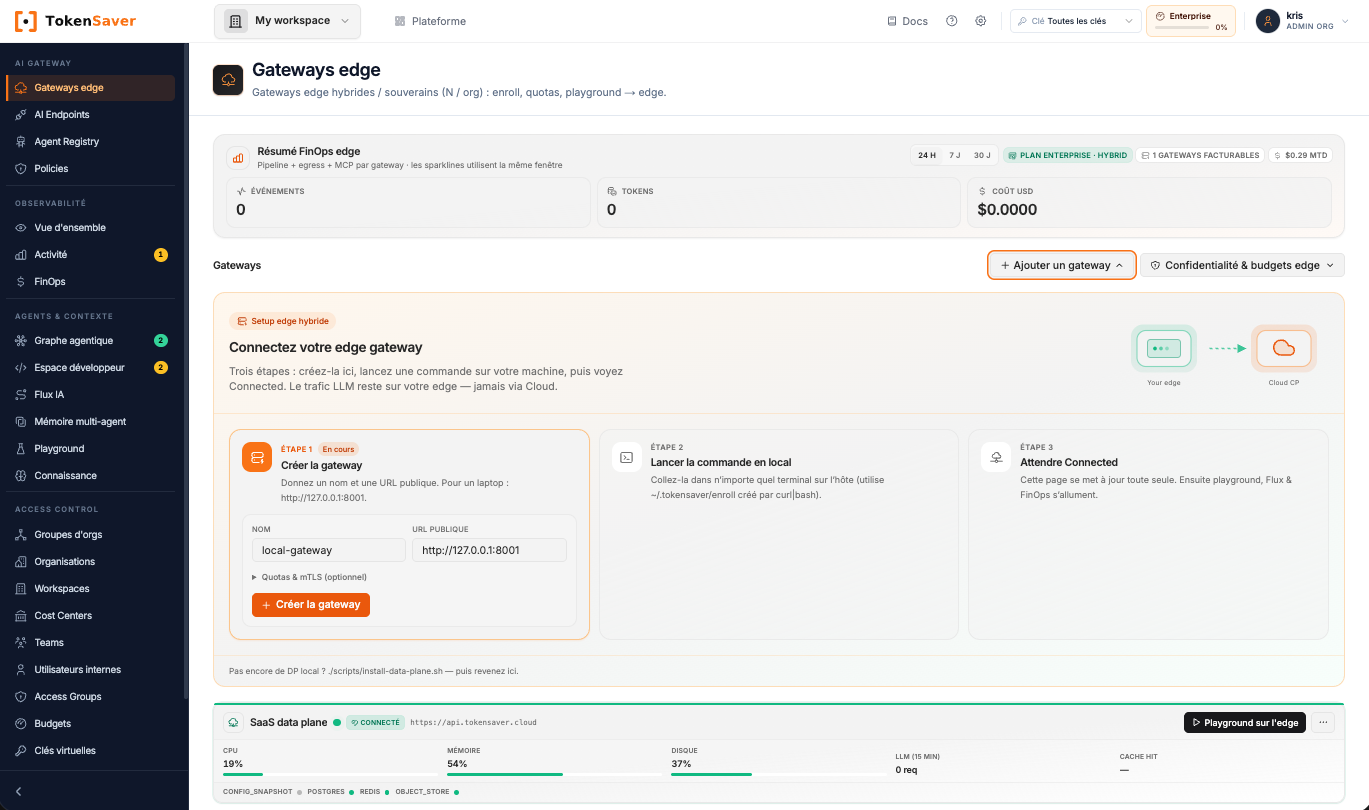
European AI gateway · SaaS · Hybrid · Self-host

The control plane for enterprise AI.

One proxy between every AI client and every LLM. Govern your agents in a few clicks, charge every euro back to the team that spent it, and keep your prompts where they must stay.

Which agent spent the most tokens this week?
tokens, up to
−45%
tokens, up to
varies by workload, measured per run
URL to change
1
URL to change
OpenAI & Anthropic compatible, the rest of your code stays as is
models in the catalogue
900+
models in the catalogue
open weight & private, every provider
on-premise possible
100%
on-premise possible
containerised runtime

How it works

Change one URL.
Everything is governed.

Connect your apps and agents to the TokenSaver gateway by changing one URL. Every call goes through your rules: budget, approved models, sensitive data. And every euro is tied to a team.

In SaaS or on your own open-source gateway. Try it below ↓

Control towerconsole · policies · FinOpsYour apps and agentsClaude CodeVS Code, CursorAgentsn8n, LangGraphInternal appsOpenAI SDKTokenSaverAI gatewayVirtual keys and budgetsRouting to 900+ modelsPrivate docs (RAG)Cache and compressionPII maskingTraces, cost per teamModels and toolsCloud LLMsAnthropicOpenAIMistralGeminiLocal modelsOllamavLLMLlamaQwenMCP toolsGitHubJiraDriveSQLControl towerconsole · policies · FinOpsYour apps and agentsClaude CodeVS Code, CursorAgentsn8n, LangGraphInternal appsOpenAI SDKTokenSaverAI gatewayVirtual keys and budgetsRouting to 900+ modelsPrivate docs (RAG)Cache and compressionPII maskingTraces, cost per teamCloud LLMsAnthropicOpenAIMistralGeminiLocal modelsOllamavLLMLlamaQwenMCP toolsGitHubJiraDriveSQLModels and tools
Connect an app
export ANTHROPIC_BASE_URL=https://api.tokensaver.cloud/anthropic
export ANTHROPIC_AUTH_TOKEN=tsv_...
claude

Only the URL and the key change: the rest of your code stays as is. Moving from the SaaS gateway to your own means changing the URL once more.

At scale · Architecture

Several teams, several sites: one gateway each, one console.

Example: Sales goes through the SaaS gateway, Engineering and Finance through their on-prem gateways. The console sets keys, budgets and approved models for each one. Prompts and documents stay in each gateway; only metadata goes up. If the console is down, the gateways keep serving.

CompanyOutside the companyControl planePoliciesKeys and rightsOFFLINEUsage by team0 runsSalesEngFinPartFinOps0 €Tokens0,0 MPrivate documents (agentic RAG)Protected dataCentral controlShared computeOn-prem, cloud, partnersSalescloudAI agentsClaudeCopilotn8nAI gatewayprompts and data stay herePrivate docsMCP toolsEngineeringon-premAI agentsClaudeCopilotn8nAI gatewayprompts and data stay herePrivate docsMCP toolsFinanceon-premAI agentsClaudeCopilotn8nAI gatewayprompts and data stay herePrivate docsMCP toolsCloud computeShared AI compute on-prem, sharedPartnercloudAI agentsClaudeCopilotn8nAI gatewayprompts and data stay hereShared docsMCP toolsLocal LLMrequestresponsecontrol

← Swipe the diagram →

One AI gateway per team.

Works with the stack your teams already run

OpenAIAnthropicGeminiMistralLlamaDeepSeekGrokOllamaLangChainLangGraphCrewAIn8nLibreChatClaude Code

Get started

Start in SaaS. Move to hybrid whenever you want.

Same console, same virtual keys, same rules. Only the place your prompts go through changes.

Free plan Try SaaS and hybrid for 30 days, no credit card.

1 · SaaS

One URL and one key, and you are connected.

  1. 1Create your free account on app.tokensaver.cloud: the Free plan opens the control plane and the console for 30 days.
  2. 2Add your LLM provider keys (BYOK): Anthropic, OpenAI, Mistral… They never leave the gateway and are never redistributed.
  3. 3Create one TokenSaver key per use case, with its budget and approved models. Revocable at any time.
  4. 4Replace the base URL and the key in your app or agent. Every call shows up in the console.

The code to paste is in “Connect an app”, at the top of the page.

Create my free account30-day trial, no credit card. Your own LLM keys (BYOK).

Product tour

TokenSaver in 50 seconds.

50 seconds in the real console, no mock-ups: the proxy in front of every LLM, the graph of an agent run, Claude Code tracking, compression and cost per team.

Use case · Developers

Claude Code in VS Code, finally visible and governed.

The free, open-source TokenSaver extension sits in the Claude Code flow. You see what the agent really does, what it costs and which files it wrote. No terminal, no pip install.

Mode 1 · Keep my Claude

Keep your Claude plan. No API key, no extra LLM bill. Every session is captured: calls, tools, files, tokens and cost.

Mode 2 · Route with TokenSaver

Go through your gateway. Claude Code uses a TokenSaver key: approved models (Claude, Mistral, local models…) and team quotas apply.

  1. 1Install “TokenSaver · Claude Code” in VS Code or Cursor: code --install-extension tokensaver.tokensaver-claude
  2. 2TokenSaver: Connect, then Start — Keep my Claude or Start — Route with TokenSaver.
  3. 3Code as usual: the panel shows cost and AI-written files, and “Explain this file” traces where a file came from.
See it on the Marketplace
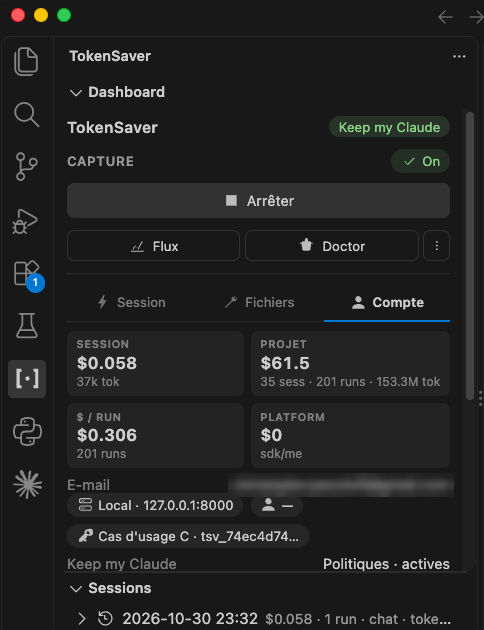
TokenSaver panel in VS Code: Keep my Claude capture on, cost per session and per project, Claude Code sessions
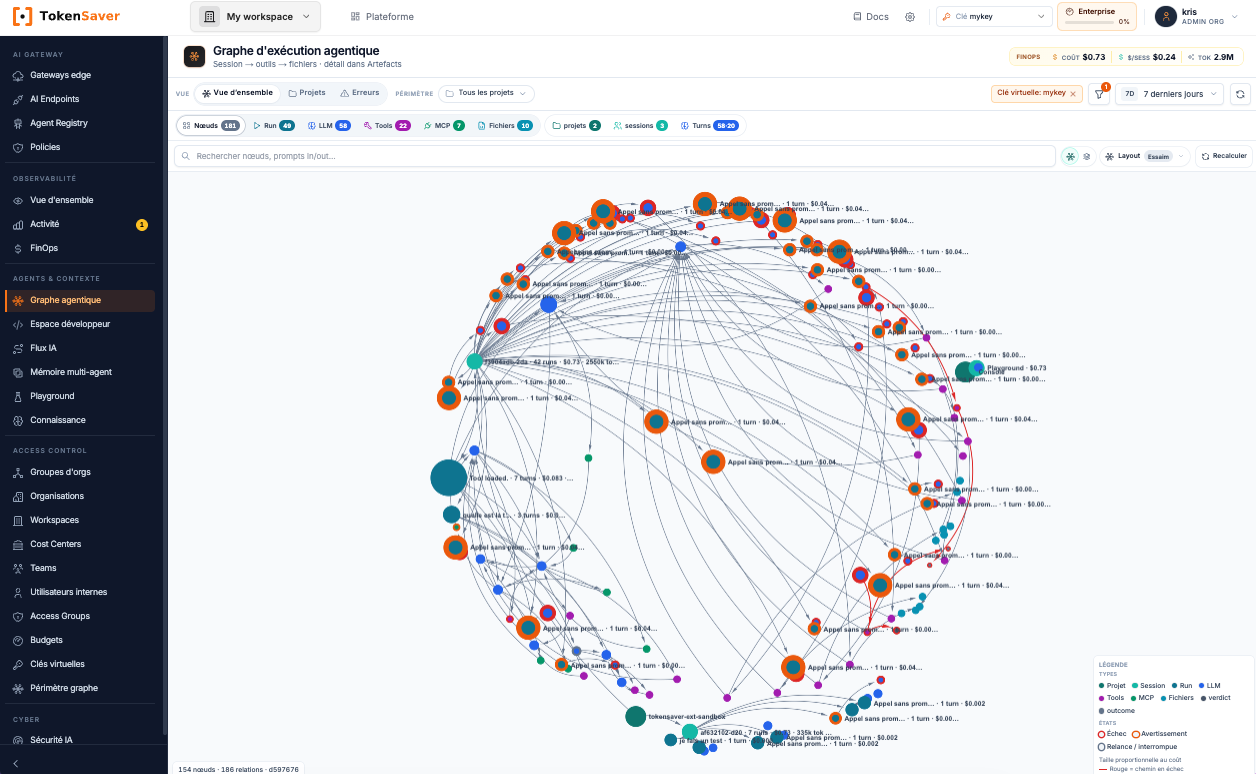
Execution graph of a Claude Code session in the console
In the console: every Claude Code session becomes a graph, from prompts to changed files.

AI governance · chargeback

Approve, switch on, cap. Then charge every euro back to the right team.

Rules are set in the console and applied on every call, whether it comes from Claude Code, Cursor, n8n or your own apps. Nothing to code.

Simplified governance

  1. Approve models and MCP tools in the Agent Registry. Anything not approved is refused by default.

  2. Switch on policies in one click: PII masking, cache, compression, RAG. No code to change.

  3. Cap quotas and budgets per key, team and project, with overrun alerts before the bill arrives.
Chargeback for your teams

Each team gets its own virtual key: tokens, cost and savings land on the right cost center, without spreadsheets.

Illustrative example · month to date

TeamCost centerSpendBudget
R&D · Claude CodeCC-410€3,412
Data & analyticsCC-520€1,870
Customer supportCC-220€940
MarketingCC-130€415

Marketing at 97% of budget · alert sent

  • Export per team and cost center
  • Cost per agent task, project by project
  • Month-end forecast from daily spend
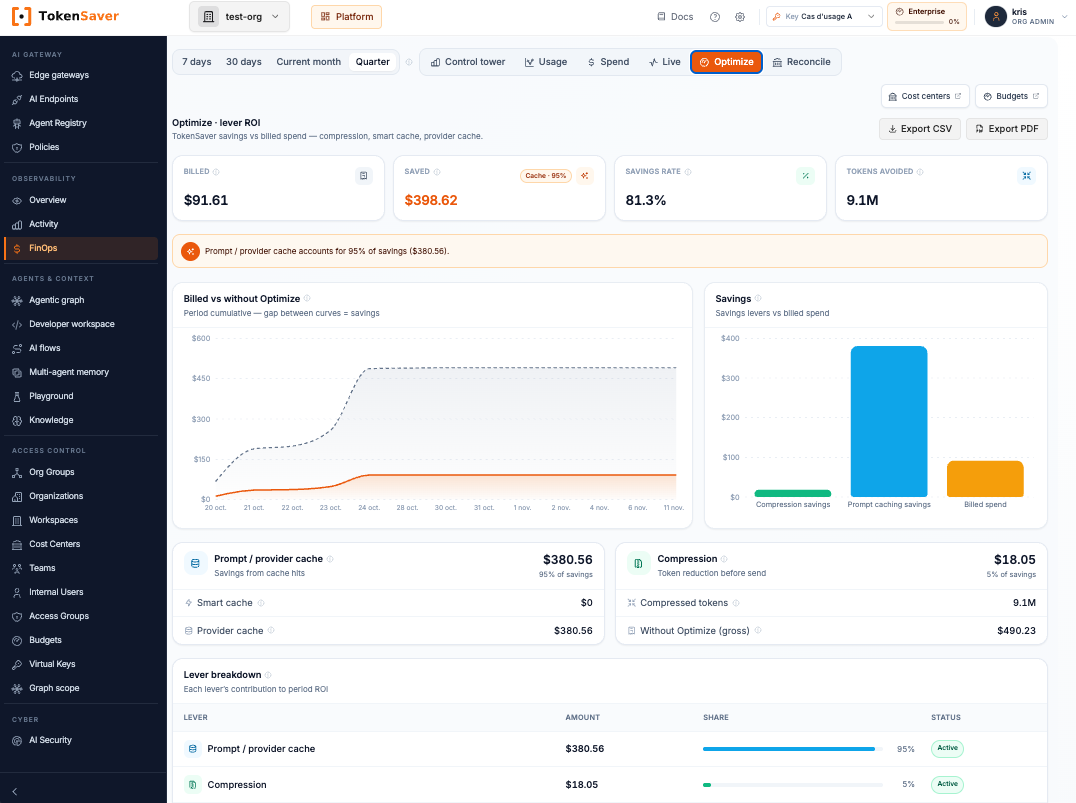
FinOps console, Optimize tab: billed amount, savings and the share of each lever (cache, compression) over the quarter
In the console: billed amount, savings from cache and compression, and the share of each lever over the quarter.

For CIOs and CISOs · Sovereignty

Every AI use case, one point of control.

The gateway (data plane) runs inside your perimeter and enforces the rules. The console (control plane) defines them, in our European cloud or on your side. In SaaS, the gateway also runs in our European cloud.

Your data where you decide

In hybrid and self-host, prompts, responses, LLM keys, cache and RAG stay on your gateway. The control plane only receives metadata, unless you choose to send more.

Your documents do not go to the LLMs

Agentic RAG indexes your documents in the gateway, and a corpus can be shared across teams and gateways, whatever the LLM. For each question, only the relevant passages are sent to the model, after compression and personal-data masking. Full documents never leave the gateway.

LLM keys never spread

Your LLM provider keys stay in the gateway. Each use case gets its own virtual key, with its budget, revocable at any time.

No lock-in

Open-source gateway, OpenAI- and Anthropic-compatible APIs, your own keys (BYOK). If the console is down, the gateway keeps serving on its last configuration.

European jurisdiction

TokenSaver SAS, Aix-en-Provence. French law, GDPR data processing agreement (art. 28), the CNIL as supervisory authority.

Proof, call by call

Signed traces for every call: agent, model, policy applied, outcome. OpenTelemetry and SIEM export for your AI Act and GDPR audits.

CLOUD Act: in SaaS, the platform is hosted in European datacenters. If this matters to you, choose self-host, up to air-gapped: nothing leaves your infrastructure. See our subprocessors

Beta program

Try it on your real use cases.

What we ask

  • →Install the gateway or the extension, on a test laptop or server
  • →Plug in a real use case for two weeks, until you see your first runs in the graph
  • →Give us 30 minutes of feedback: what works and what blocks

What you get

  • ✓Direct access to the product team, answers within the day
  • ✓Early access to what is new: gateway, extension, graph
  • ✓Your input taken into account before the public release

Frequently asked questions

Do my prompts go through TokenSaver?

In SaaS, yes: they go through our gateway, hosted in European datacenters, then to the LLM provider you choose, with your keys. In hybrid or self-host, no: they stay on your gateway, and the control plane only receives metadata (model, tokens, cost, status).

Are my documents sent to the LLMs?

Not in full. Agentic RAG keeps your documents in the gateway and only sends the model the passages relevant to the question, after compression and personal-data masking. In hybrid or self-host, documents stay in your infrastructure.

Can I move from SaaS to hybrid without starting over?

Yes, from the Free plan. You keep the same organization, the same virtual keys and the same policies: you enroll a gateway, then replace your apps’ base URL with your gateway’s.

Do I need to open a port for hybrid mode?

No. The connection always goes from the gateway to the control plane: enrollment, signed configuration, metadata. The control plane never opens a connection to your gateway.

What do I need?

In SaaS: a browser and a key from at least one LLM provider. For a private gateway: macOS or Linux, ideally with Docker (otherwise the install runs on native Python).

What happens after the 30-day trial?

The control plane and the cloud console stop, and access to the SaaS gateway is revoked: to keep using SaaS, move to a paid plan. A private gateway, enrolled or not, keeps running on your side, on its own, with no quota limit, configured by hand. The VS Code extension keeps connecting to it.

Can I uninstall everything cleanly?

Yes. The gateway is a set of containers or local processes: stop them and delete the folder. In VS Code, “TokenSaver: Disconnect” removes the variables and secrets set by the extension.

Experience the AI control plane.

Personalised demo, governed 30-day POC, Early Adopter pricing.

La French Tech Aix-Marseille Région Sud

Member of La French Tech Aix-Marseille